
How it Works: Tame Your Tabs in 3 Simple Steps
tabMeister doesn't just manage tabs; it organizes your entire digital life the moment you install it.
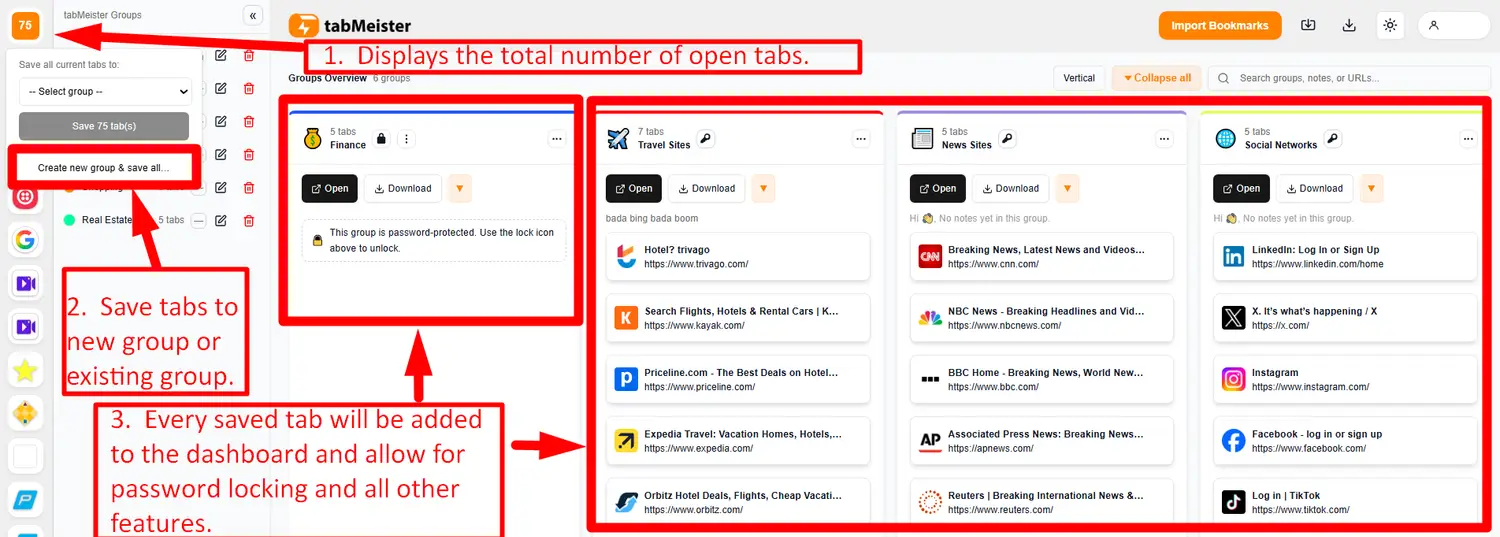
The Instant Rescue (See Diagram 1 & 2):
Click the + New Tab button to open the dashboard. You'll instantly see how many tabs you have open. In one click, you can Create New Group & Save All, or Save All to an Existing Group, turning chaos into an organized list.
Organize & Enhance (See Diagram 3):
As you create more groups, your dashboard becomes a visual command center. Use the password protection feature, color tagging, add relevant emojis, and organize them exactly how you desire. This dashboard replaces the anxiety of 50+ tiny favicons.
Unlock Power Features:
Once saved, your groups unlock tabMeister’s unique power features: use password protection for privacy, import your old bookmarks, and browse visually using the flipbook view or a clean list/grid layout.
tabMeister is quite simply the "none-of-a-kind" extension built by power users for power users!